
Make music by drawing
How to Make Music by Drawing (Even If You Can't Play a Note)
To make music by drawing, you draw on a canvas where left to right is time and height is pitch: a higher line plays a higher note. Every note snaps to a musical scale, so whatever you draw sounds in tune. Press play and a playhead sweeps across your drawing, turning it into a melody you can loop, add drums to and share.
On this page
You don't need to read notes, know chords or own an instrument. If you can draw a wavy line, you can draw a song. This guide explains how drawing to music works, walks you through your first melody step by step, and shows a few shapes that sound good right away. You can follow along and try it in your browser with our free draw music tool, no install and no sign-up.
How drawing becomes music
A drawing canvas for music works like a sheet of graph paper turned into a tiny music box. Two rules do almost all the work:
- Left to right is time. The canvas is a short loop. Whatever you draw on the left plays first, whatever you draw on the right plays last, and then the loop starts again.
- Height is pitch. A line near the top plays high notes; a line near the bottom plays low notes. A line that climbs plays a rising melody, a line that falls plays a falling one.
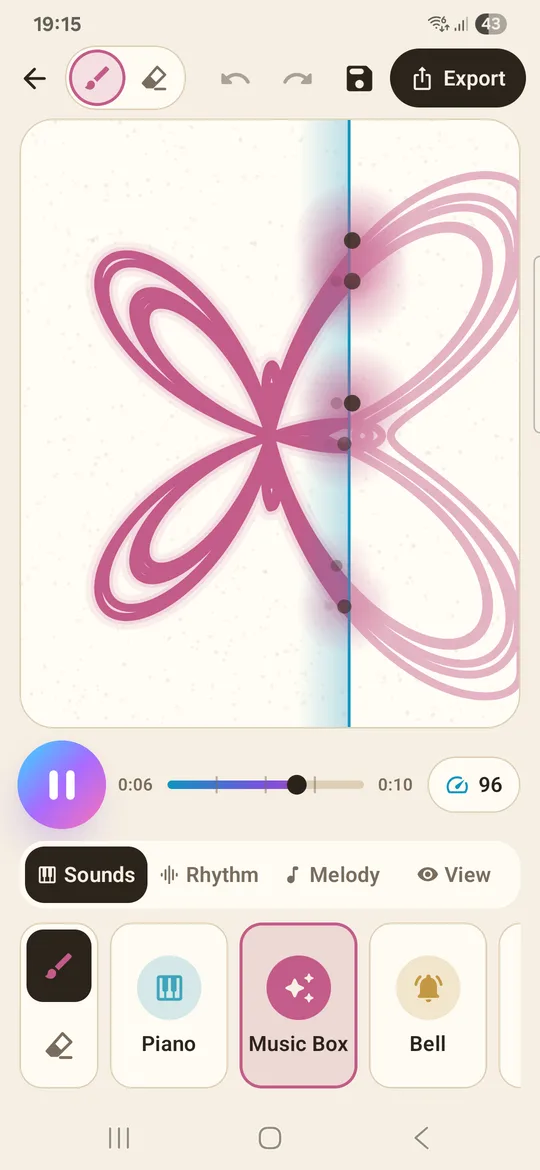
While the music plays, a playhead (a thin vertical line) sweeps across the canvas so you can see exactly which part of your drawing is sounding. You can tap the timeline to jump to any point and play from there, which is handy when you want to hear one section again.
Why your drawing always sounds in tune
This is the part that makes drawing music fun instead of frustrating. Every note you draw snaps to the chosen scale, a set of notes that belong together. Notes that would clash are simply not available, so a random scribble still sounds musical. We like to put it this way: draw it wrong, it still sounds right. If you want to know why that works, our guide to music theory for drawing explains scales in plain words.
Colour is the instrument
Each colour plays a different instrument. In the browser tool you can pick piano, bell, synth or marimba. In the Inkbeat app there are nine: piano, music box, bell, synth, marimba, pluck, soft keys, flute and guitar. Drawing two lines in two colours gives you two instruments playing together, like a small band.
How to make music by drawing: step by step
Here is the quickest way to turn a drawing into music, using the free online tool on our home page. The app works the same way, with more instruments and options.
- Open the drawing canvas. Go to the draw music online tool. It runs in your browser on a phone, tablet or computer.
- Pick a colour (instrument). Start with piano: it is clear and easy to follow while you learn how height maps to pitch.
- Pick a mood. Happy is the safest first choice. Dreamy sounds softer and a little sad, Classic sounds like a familiar major-key tune, and Jazzy has a cool, bluesy colour.
- Draw a line from left to right. Make it go up and down like a hill or a wave. Each point of the line becomes a note at that moment in time.
- Press play. Watch the playhead sweep across and listen. If a part sounds too busy, undo and draw it again with fewer bumps.
- Add a beat and set the tempo. Turn the drum beat on and move the tempo slider. A slower tempo feels calm; a faster one feels like dance music.
That is the whole method. Most people get a melody they like within a couple of minutes, because there is nothing to get "wrong".
Tip: Leave some empty space. Music needs rests just like speech needs pauses. A line with gaps in it sounds more like a real tune than a line that fills every step.
Shapes that sound good
Once you know that height is pitch, you start to hear shapes before you play them. A few to try when you draw a song:
- Wave. A gentle wave from left to right gives a smooth melody that rises and falls. It is the easiest shape to make sound pleasant.
- Staircase. Short flat steps going up give a climbing scale, the classic "build-up" sound.
- Heart or star. An outline crosses most moments twice, at its top edge and its bottom edge, so you hear two notes together, like a melody with a second voice under it. The browser tool has heart, star and wave starter shapes to try.
- Dots instead of lines. Separate dots play short separate notes, which sounds more rhythmic and bouncy.
- Call and answer. Draw a short shape high on the left, then a similar shape lower on the right. It sounds like a question and a reply.
Drawing music in the browser vs the app
You can make music by drawing in two places, and they share the same idea.
The online tool on this site is free and needs no install or account. You get a grid canvas, four instrument colours, four moods, a tempo slider, a drum beat on/off switch, undo, clear, a few starter shapes and a Download video button. It is the fastest way to try drawing to music.
The Inkbeat app for Android (free with ads, works offline, no account) adds the rest: nine instruments, line mode and block mode, an eraser, undo and redo, a full rhythm section with kick, snare, clap, hi-hat, bass and arpeggio layers, eight moods, all twelve keys, and 44 ready-made designs to play and remix. It can also export your song as a vertical video, as WAV audio or as MIDI. Our draw music app guide covers it in detail.
Turn a drawing into music you can share
Once your loop sounds good, you will probably want to keep it. In the app, songs are saved in "My Music", and you can export:
- Video (MP4, 1080x1920) of your drawing playing in sync with the music, sized for TikTok, Instagram Reels and YouTube Shorts.
- Audio (WAV), for example as a ringtone or for a video edit.
- Music notes (MIDI), to keep working on the melody in GarageBand, FL Studio, BandLab or another music app.
Exported videos carry a small "Made with Inkbeat" watermark. For the full walkthrough, see how to turn a drawing into a music video.
Questions people ask
Can you make music by drawing without knowing music?
Yes. Because every note snaps to a scale, you don't have to pick notes yourself. You only decide where the line goes: higher for higher notes, further right for later in time. The tool keeps everything in tune.
How do you turn a drawing into music?
Draw on a canvas where the horizontal axis is time and the vertical axis is pitch, then press play. A playhead reads the drawing from left to right and plays each point as a note in the chosen scale.
Is there a free way to draw music online?
Yes. The draw music tool on our home page is free, runs in your browser and needs no sign-up. It has four instruments, four moods, a tempo slider and a drum beat.
Why does my drawing sound out of tune or messy?
It is rarely out of tune, since notes snap to a scale, but it can sound busy. Draw fewer bumps, leave gaps for rests, use one or two colours instead of many, or slow the tempo down.
Can I draw music on my phone?
Yes. The online tool works in a phone browser, and the free Inkbeat app for Android adds nine instruments, drums and bass, 44 designs and video export.